Substance painter brush paints over multiple UVs
Sometimes your brush oder eraser paints over UV parts that you don´t want to paint … change Aligment in the brush-tool from Tangent to UV to fix the error
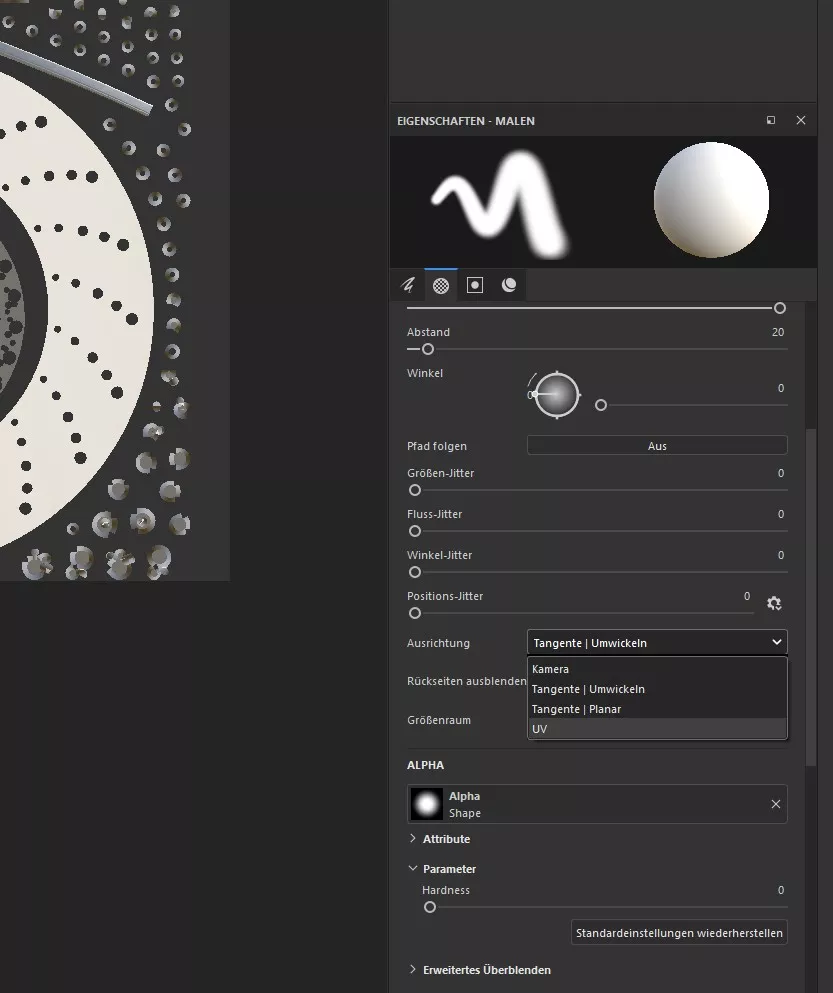

Sometimes your brush oder eraser paints over UV parts that you don´t want to paint … change Aligment in the brush-tool from Tangent to UV to fix the error
script takes only the albdeo/diffuse channel
I have never used before a railspline in a sweep-object … so here is how it works. This is a sweep object with a regular profile-spline and a spline for the extrusion and its deformed because the profile rectangle is trying to get along with the b-spline and it looks kind of messy . thats…
Ich hab das update von R21 / Octane 2020.1.4 auf R23 / Octane 2020.1.5 gemacht und bin dann plötzlich vor der Tatsache gestanden, dass ich viele Objekte in einer Szene die Koordinaten per Koordinatenmanager nicht mehr bewegen, drehen oder skalieren konnte, so als ob eine Schutz-Tag auf allen angewendet werden würde. Nach ewigen hin und…
https://realaturtur.gumroad.com/l/variabletokensc4d Variable Tokens plug-in for Cinema 4D gives a ten (10) token slots that you can use as you wish. Created for advanced Cinema 4D users who need versatile tokens. Required Cinema 4D version R21 -> 2023 by Arttu Rautio
https://code.vonc.fr/outils open source tool – calcute the area and volumen of an object in Cinema4D
i had this problem for ages, but it seems nobody else.now i found a solution. At least in the universal material control the metallness with an extra node (float, image, … ). Then the function „solo texture“ also works in metall materials for roughness,. bump, and so on. Cinema 4D R23, Octane 2020.1.5-R4