Substance painter brush paints over multiple UVs
Sometimes your brush oder eraser paints over UV parts that you don´t want to paint … change Aligment in the brush-tool from Tangent to UV to fix the error
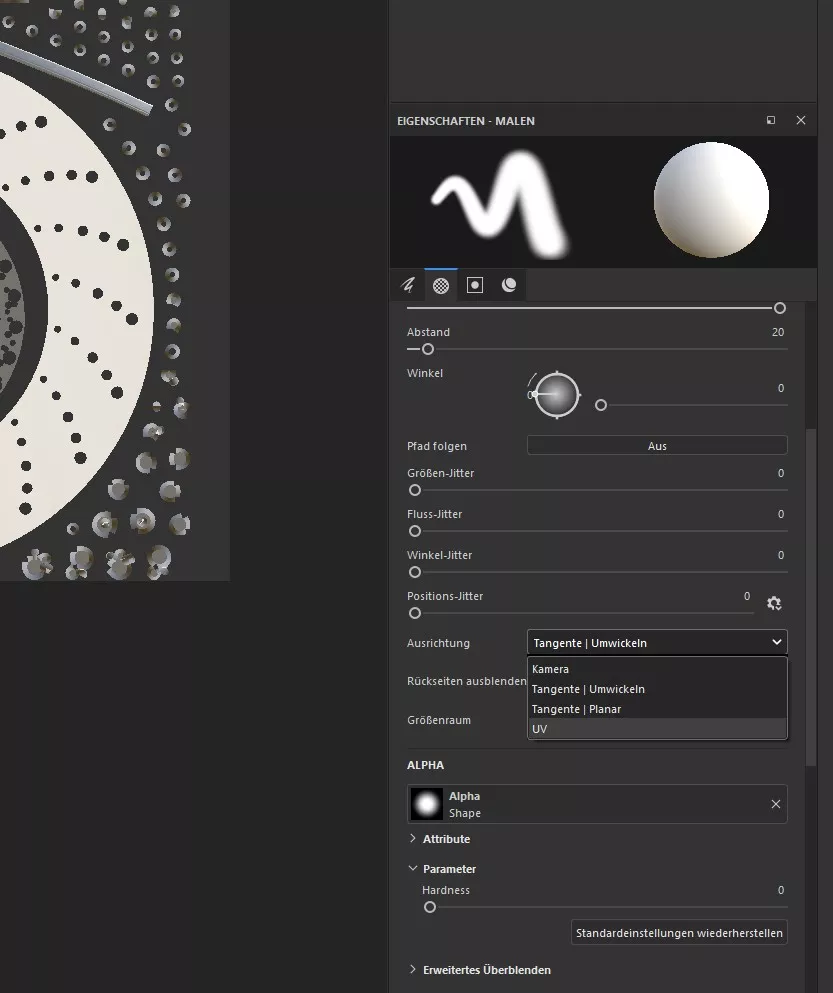

Sometimes your brush oder eraser paints over UV parts that you don´t want to paint … change Aligment in the brush-tool from Tangent to UV to fix the error
script takes only the albdeo/diffuse channel
https://code.vonc.fr/outils open source tool – calcute the area and volumen of an object in Cinema4D
great tool for controlling all of your fans in your case with the gpu temperature or other sources. I am using GPU for 3D rendering and this tool allows me to control every fan perfectly. https://www.argusmonitor.com/
I organized my UDIMs in a Mesh with Rizom UV in 2 columns and 4 Rows, for better a better overview. Looks like this 1001, 1011, 1021, and so on. In Substance Painter there was no problem, but when i tried loading the texture in octane for cinema4D, the pattern was not recognized and i…
I have no idea why or any better solution until now, but if you are experiencing that your materials are only white in the octane liveviewer you can try to change the projection-style of your material from (standard) uvw-mapping to spherical mapping (or any other type) in the c4d attribute window. Looks like this is…