PC Fan Control with GPU temperature
great tool for controlling all of your fans in your case with the gpu temperature or other sources. I am using GPU for 3D rendering and this tool allows me to control every fan perfectly.
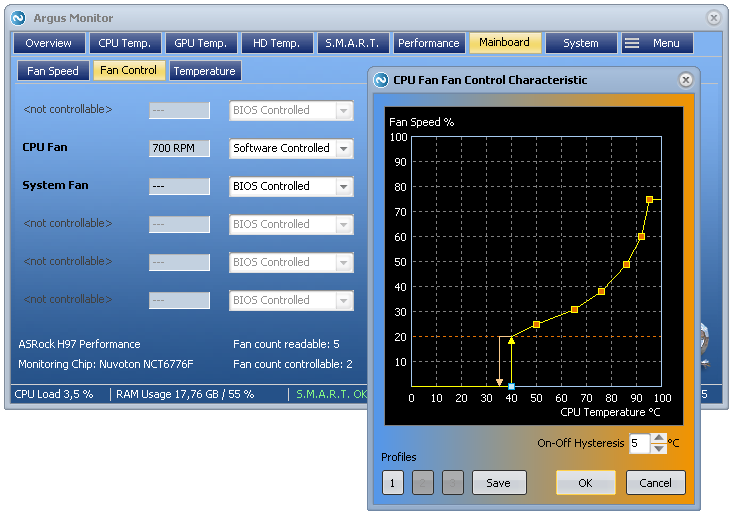

great tool for controlling all of your fans in your case with the gpu temperature or other sources. I am using GPU for 3D rendering and this tool allows me to control every fan perfectly.
Instead of trying to model the knots yourself
Ich hab das update von R21 / Octane 2020.1.4 auf R23 / Octane 2020.1.5 gemacht und bin dann plötzlich vor der Tatsache gestanden, dass ich viele Objekte in einer Szene die Koordinaten per Koordinatenmanager nicht mehr bewegen, drehen oder skalieren konnte, so als ob eine Schutz-Tag auf allen angewendet werden würde. Nach ewigen hin und…
Ein Spline wird mittels Kamera-Ansicht (wichtig) in die entsprechende Richtung projiziert. Also in Vorne, Oben, etc … Ansicht wechseln und dann einen Spline per Befehl – „Mesh – Spline – Projizieren“ auf das Objekt anpassen. Er wird wohl teilweise in dem Objekt verschwinden, also muss man ihn eventuell wieder etwas zurück bewegen um ihn zu…
I organized my UDIMs in a Mesh with Rizom UV in 2 columns and 4 Rows, for better a better overview. Looks like this 1001, 1011, 1021, and so on. In Substance Painter there was no problem, but when i tried loading the texture in octane for cinema4D, the pattern was not recognized and i…
Packing Options – Scale Optimization